BREAKING NEWS

Friday, 29 April 2016

Enjoy Music While Swimming With The FINIS Duo

finis-duo-underwater-1
Listening to music is great for working out, as it helps elevate mood, distract from fatigue, and gives you that extra boost of motivation to keep on moving. And while there are plenty of ways to enjoy music while running, cycling, or pumping iron in the gym, there aren’t quite any options for people who take laps in the pool for exercise. At least, we thought so until the FINIS Duo came across our radar.
A music player designed for underwater use, it lets you listen to music while you swim, dive, and goof around the pool. That way, you can rock out to your favorite playlists while doing your morning swim, then try to sing along and end up swallowing a heck of a lot of water instead. Or something like that.

finis-duo-underwater-2
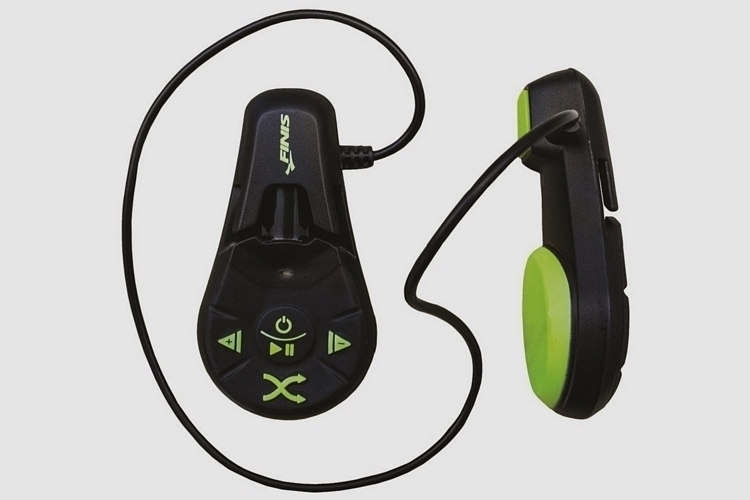
The FINIS Duo doesn’t quite work the same way as the iPod Shuffle you used to rock years back. Instead of headphones (which will be problematic in the water), it uses bone conduction to transmit sound your way. To use, simply clip the music player to the strap of your swimming goggles in a way that rests the backside to your cheekbone, press the playback buttons (all controls are on the outer side), and enjoy.  It’s waterproof up 3 meters and can be submerged up to 30 minutes straight, so as long as you’re not deep sea diving or retrieving pirate treasure, this should work great. Features include 4GB of onboard storage, MP3 and WMA support, and a battery rated at 7 hours of playback.

finis-duo-underwater-3
Available now, the FINIS Duo is priced at $94.99.
Check It Out

Thursday, 28 April 2016

This Curved, Wooden iPad Stand Works On Both Hard And Soft Surfaces

yohann-ipad-stand-1
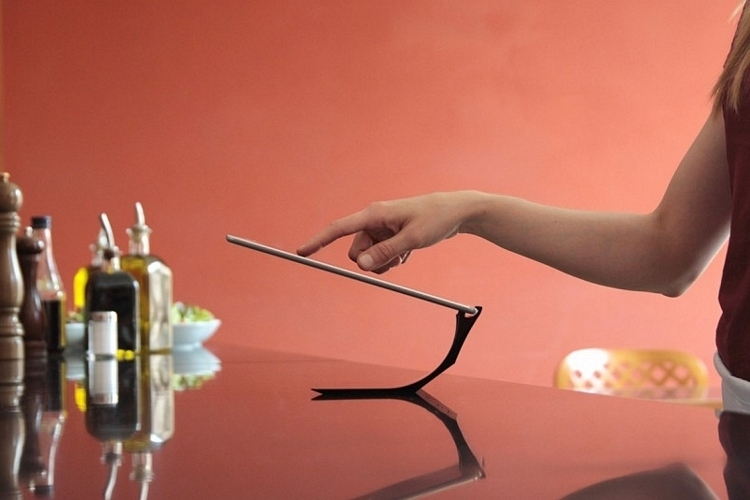
Most iPad stands look like… stands, which is to say, they don’t look all that sightly when merely sitting on your desk. And while there’s nothing wrong with that, wouldn’t you rather have something that looks like a display piece when it sits there empty? That’s exactly what you get when you trade in that wireframe stand for the Yohann iPad Stand.
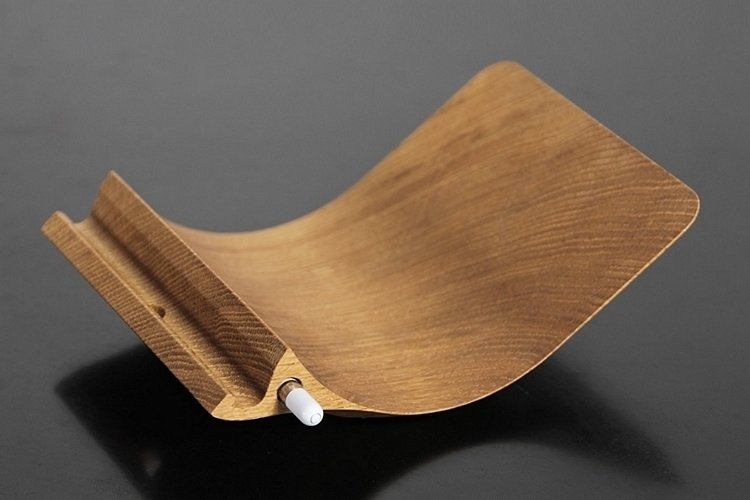
Designed by Swiss architect Berend Frenzel, the stand features a curved body behind the dock that holds the actual tablet. That curved body can be set down in one of three angles, giving you different options for propping up your iPad in both portrait and landscape orientations.    Even better, the curved shape allows it to work not just on hard surfaces like tables and floors, but on soft surfaces, too, so you can stand your iPad in bed, on a pillow, or even on a hammock.
yohann-ipad-stand-2
The Yohann iPad Stand comes in three different sizes: one for the standard iPad, another for the Mini, and a large one for the 12-inch Pro. All three are available in a wooden construction, each of which is individually milled from a single piece of wood before being sanded, polished, and waxed by hand. The Pro model also comes with magnets under the dock, where you can snap on your Apple Pencil for a handy storage spot. All the stands are strictly for iOS tablets, although they do make a 9.7-inch version made from polymer that uses adapters to accommodate other brands of tablets.
yohann-ipad-stand-3
Pricing for the Yohann iPad Stand starts at $129.
Check It Out

Philips Noodle Maker Turns Fresh Ingredients Into Ready-To-Cook Noodles In Just 15 Minutes


If you spend a good portion of the grocery budget on pasta and noodles, it might be a good idea to just consider making your own at home.  And while making your own noodles sound like laborious work, it doesn’t have to be with the Philips Noodle Maker.
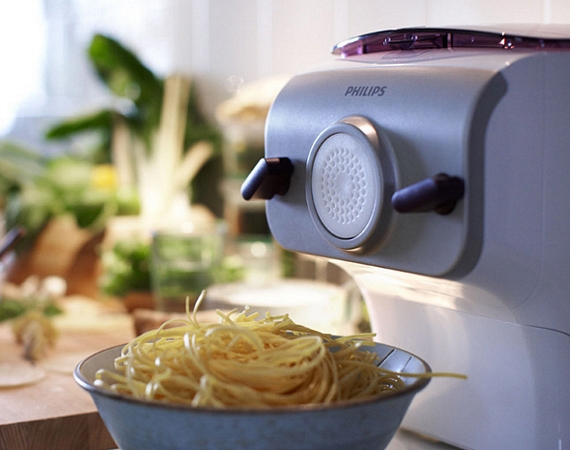
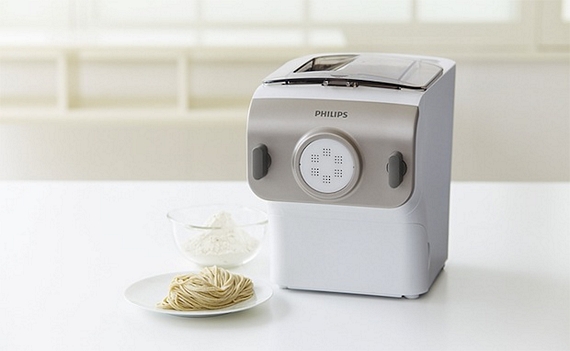
A dedicated countertop appliance that churns out fresh noodles from scratch, it will do everything that’s needed to turn your base ingredients into ready-to-cook noodle strips.  Just dump in the flour, eggs, water, and whatever else you want to mix in (like Hipster Dust), press a button, and sit back.  The machine will take care of mixing the ingredients and kneading them into a dough before extruding into the familiar-looking ribbon-like tubes you can then use to make your favorite recipes.
The Philips Noodle Maker comes with four different extrusion caps that will automatically cut the noodles into a specific shape, either in the likeness of udon, soba, ramen, or spaghetti.  Since you control all the ingredients, you can get creative with this thing, mixing in unconventional items to change up the taste and nutritional contents of your favorite noodle dishes.  Like, throw in some meatsauce along with the dough, so your pasta already tastes like cooked spaghetti as soon as it comes out or something.  Yeah, that probably won’t work (but should be fun to try).  It can make up to 500 grams of noodles in one go, which should be enough to feed up to four people, with one batch taking just 15 minutes to make.
Currently, the Philips Noodle Maker is only available in Hong Kong, Taiwan, and Japan but we are pretty sure to we'll see some variant of this in US market soon. Price is ¥32,000 (a little over $300).


Tuesday, 26 April 2016

Pictar Turns Your iPhone Into A Point-And-Shoot With Physical Controls

pictar-iphone-camera-grip-1
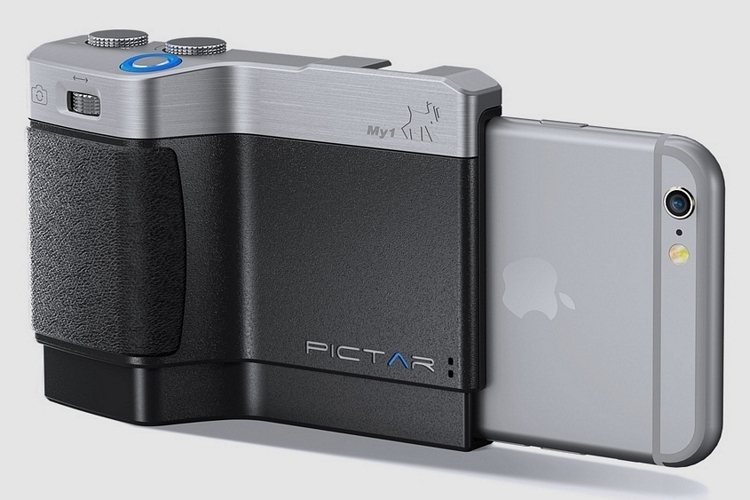
It’s not the first camera grip to come out for the iPhone. The Pictar, however, makes a solid case by turning your iPhone into a veritable point-and-shoot. Beyond providing a grip for comfortably holding your phone while taking pictures, it comes with physical controls to deliver a camera-like experience.
When attached to your phone, the grip transforms the lower half of your phone into a conventional camera that you can comfortably hold with one hand. That way, you can take quick shots without worrying about dropping your phone at any point during the process.
pictar-iphone-camera-grip-2
Aside from offering an ergonomic grip, the Pictar comes with a shutter release button for quickly pulling the trigger, complete with a half press mode to lock focus and exposure before taking the final capture. A zoom ring out front lets you zoom in and out on the display without having to touch the screen, all while doubling as a quick way to switch from the rear cam to the front cam and vice versa with a single press. Two knobs along the top let you adjust brightness level and shooting mode, respectively.
pictar-iphone-camera-grip-3
Both the zoom ring and the shooting mode knob can be programmed separately, allowing you to use them to adjust any settings you want easy access to when shooting. The app also comes with a virtual wheel that you can quickly turn with your thumb for flipping through a variety of settings. Other features include a tripod socket, accompanying neck and wrist straps, and a cold shoe mount.

A Kickstarter campaign is currently running for the Pictar. Pledges to reserve a unit starts at $90.

Saturday, 23 April 2016

DJI Matrice 600: Finally, A Drone That Can Lift Professional-Grade Cameras

DJI-matrice-600-0
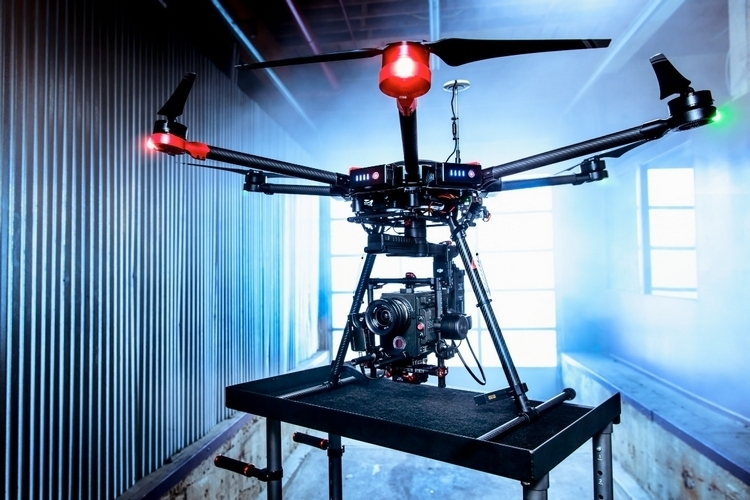
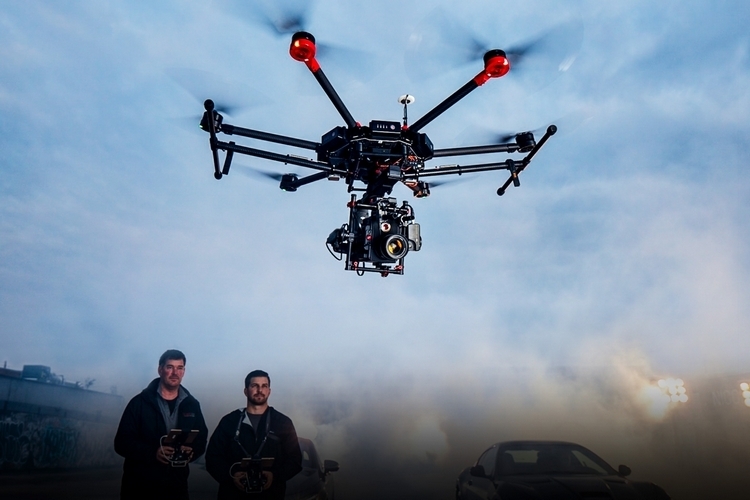
Yes, you can use any drone to shoot aerial videos. If you want cinema-grade footage, though, you’re going to need a drone with enough lift to carry heavier professional-quality gear. That’s exactly what the DJI Matrice 600 brings to your filmmaking arsenal.
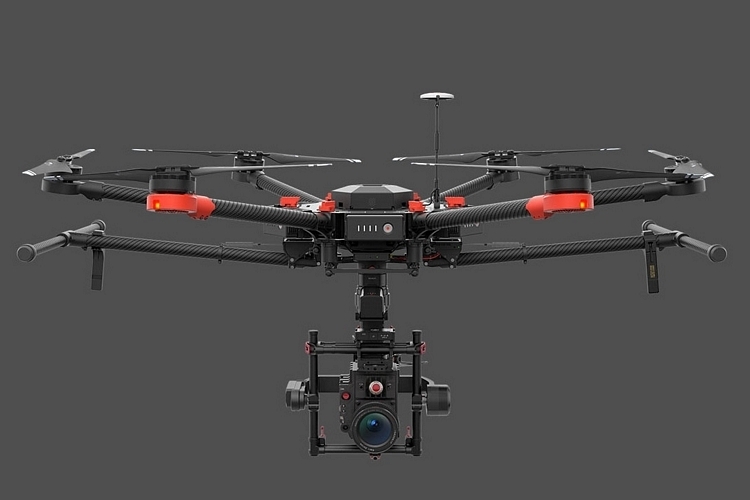
Designed for professional cinematography, the drone can carry payloads up to 13.2 pounds, ensuring you can use it with a wide range of cameras, from smaller micro-four thirds shooters to DSLRs to high-end cameras like the Red Epic. Granted, it still won’t let you shoot aerial scenes from the larger end of the spectrum, like the Blackmagic URSA or the For.A FT-One, but this does allow you to fly with more compact filmmaking gear.
DJI-matrice-600-1
The DJI Matrice 600 uses a new flight controller called the A3, a self-adaptive flight system that can automatically adjust the parameters based on whatever payload it’s carrying, along with options to add two extra GPS radios and two extra IMUs for redundancy and real-time data comparison (basically, it takes readings from all three to ensure accuracy). It pairs that with a new video downlink called Lightbridge 2, which streams 1080p footage at 60fps over a distance of up to three miles, along with extended flight time that allows it to hit the air for up to 36 minutes with a DJI Zenmuse camera and up to 15 minutes if you max out the payload capacity with something like the RED Weapon.
DJI-matrice-600-2
Along with the new drone, DJI is releasing an accompanying gimbal, which can similarly work with most any of the cameras in the market. Like the outfit’s previously releases, the gimbal gives users the ability to move and rotate the camera while in the air, apart from keeping the footage steady.
Available now, the DJI Matrice 600 is priced at $4,599.


Friday, 22 April 2016

Use Intel’s New RealSense Kit To Build Powerful Vision-Armed Robots

intel-realsense-robotic-development-kit-1
We’re starting to see products using Intel’s RealSense technology (e.g. the Naked 3D Scanner) and we’re betting that we’ll see a lot more throughout the year. Intel, naturally, wants to hasten the process and what better way to do that than to encourage home tinkerers to experiment with the tech in their upcoming projects? The Intel RealSense Robotic Development Kit is the company’s attempt to make that happen.
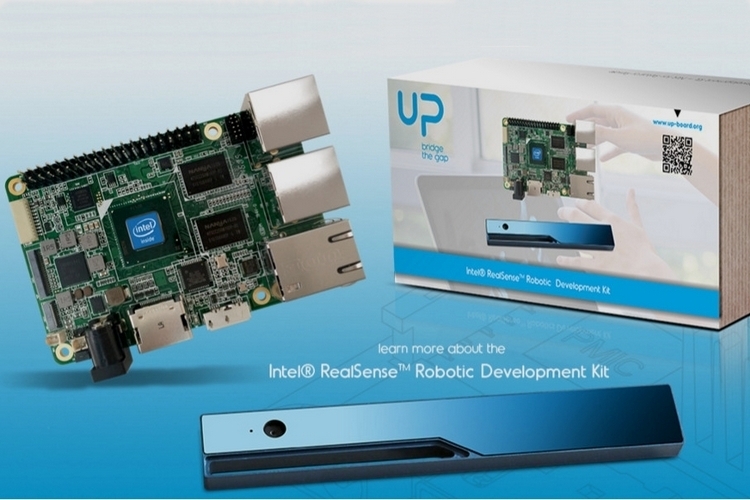
No, they didn’t quite make a robot that you can program and customize like Willow Garage did a while back. Instead, it’s a kit consisting of a camera and a development board that Intel describes as a combo for bridging “the gap between rapid prototyping and productization.” Basically, it’s meant to provide makers with powerful building blocks for robotic and technological applications, so you can finally put together that Godzilla robot you’ve been meaning to build to take over the world. Or something like that.
The Intel RealSense Robotic Development Kit consists of the outfit’s RealSense 200 Camera and a development board similar in size to the Raspberry Pi. Designed to provide decent computing power, it comes with a quad-core Intel Atom x5 CPU, Intel HD 400 graphics, and 4GB of DDR3 RAM, with built-in support for Ubuntu, although it should easily handle Windows, Android, and other Ubuntu flavors since this is just a standard Atom-based SoC. It comes with multiple built-in interfaces (USB 2, USB 3, Ethernet, eDP, CSI, HDMI, and I2S audio), along with a 40-pin general purpose bus for custom additions.
Slated to ship in June, the Intel RealSense Robotic Development Kit is priced at $249.99.

Wednesday, 20 April 2016

Enjoy 96TB Of RAID Storage With The LaCie 12big Thunderbolt 3

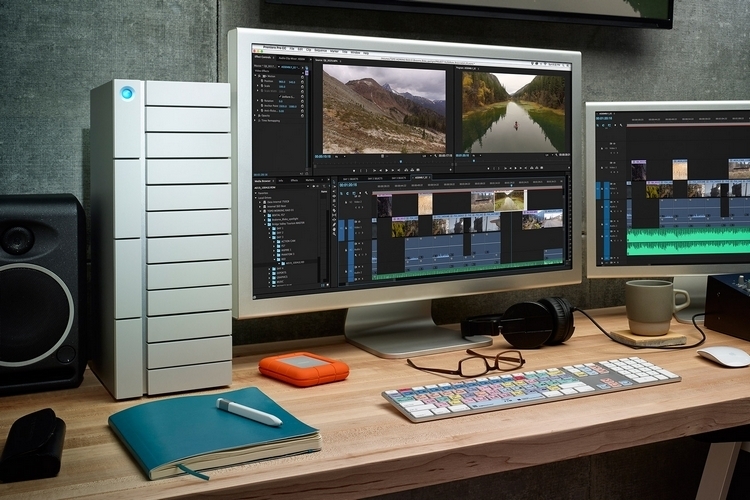
lacie-12big-thunderbolt-3-tower-1
Serious digital hoarders need serious storage space. The massive amount of movies, shows, and games you’ve downloaded off torrent need to make room somewhere, after all. And when it comes to off-the-shelf storage boxes, it’s tough to find something with more space than LaCie’s 12big Thunderbolt 3.
Clad in a form factor similar to PC towers, the system comes with 12 front-loaded drive bays that can each be stuffed with 8TB hard disks for a massive 96TB capacity. Whether you’re a serious hoarder who never deletes anything, a filmmaker who edits 4K clips on a regular basis, or just an eccentric dude who wants to make an offline copy of the entire internet just in case of an apocalypse, this thing should offer your best shot at never running out of space.
lacie-12big-thunderbolt-3-tower-2
The LaCie 12big Thunderbolt 3’s 12 hard drives all work together as one system, giving you a massive space to dump up to 100 hours of 4K footage without having to manually break files up. With a hardware RAID controller and 7,200 RPM drives, it boasts input/output speeds of up to 2,600 MBps, so even working with 6K videos won’t slow down your hardware. It comes with two Thunderbolt 3 ports, so you can hook one up to a computer and the other to a second 12big storage box, with the ability to daisy chain up to six boxes together for a mind-blowing 576TB of storage. Features include hot-swappable drive bays, a USB-C slot, four redundant fans for cooling, and multiple indicator LEDs to keep you informed of what’s going on.

No pricing yet, but the LaCie 12big Thunderbolt 3 will come out in the summer.
 
Back To Top
Copyright © 2014 Amazing Things. Designed by OddThemes | Distributed By Gooyaabi Templates